Posts

How to Backup / Restore studies (images) from old DCM4CHEE 2.18.x server to New dcm4chee 2.18.x Server

Image
Why ? What ? Sometimes we need to move the existing PACS environment to a newer one due to space limitations as well as due to other security issues. Here I am going to discuss the steps that need to take for the backup and restoration of ' DCM4CHEE 2.18.1' . Here I call ' ServerA ' as my existing server and ' ServerB ' as the targeted new server where we need to deploy latest backup. How to backup images from ServerA? Its quite easy to backup old images and database into a new DCM4CHEE-2.18.1 version platform. Backing up sense has two actions:  1. Backup the 'Archive' folder where Dicom images have been saved. 2. Backup the mysql database named as 'pacsdb' where username and password are ' pacs'. Backup 'Archive' folder at  ‘/opt/dcm4chee-2.18.1-mysql/server/default/archive'  : Use pen drive to copy (Use Ubuntu GUI) OR Create a Network Share using 'Samba'  at '/tmp/ Share'   and copy the...
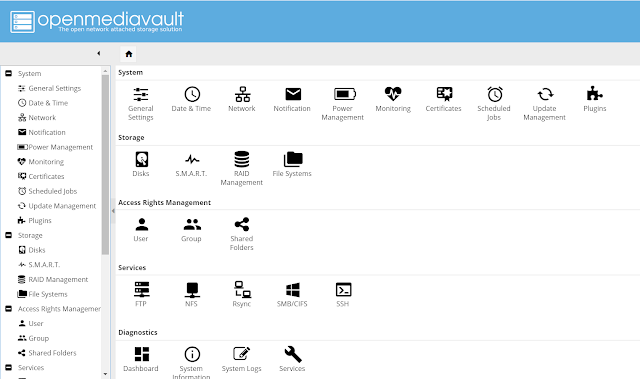
My views on “OpenmediaVault” to manage small scale servers…which is an Open Source solution

Image
My Observation: This is based on Debian Linux kernel. The main feature of it is a web-based server administration panel. We can use web admin panel to monitor and get automated emails or alert based on the activity like the use of Amazon Cloud Watch. I highlighted the following key features as follows: ·          Web-based server administration ·          View services and their histories ·          Already configured main services such as SSH, FTP, NFS, RSYCN & SMB (active directory in windows). ·          GUI management of above-mentioned services ·          GUI for email notifications ·          GUI for, Scheduled jobs (Cron jobs) ·          Storage management especially when we ...

How to deploy the Opensource PAC System using DCM4CHEE(Practical Steps)…

Install DCM4CHEE sudo apt-get install software-properties-common sudo add-apt-repository ppa:webupd8team/java sudo apt-get update sudo apt install oracle-java8-installer set default path... sudo apt install oracle-java8-set-default sudo apt-get install mysql-server //Login to mysql mysql –u root -p create schema pacsdb; grant all on pacsdb.* to pacs@localhost identified by 'pacs'; flush privileges; \q # Download the Jboss server, Need the specific version #http://sourceforge.net/projects/jboss/files/JBoss/JBoss-4.2.3.GA/jboss-4.2.3.GA-jdk6.zip/download # Download the DCM4CHEE #http://sourceforge.net/projects/dcm4che/files/dcm4chee/ Latest ... #DCM4CHEE 2.18.3 doesn't have install files thus used 2.18.1 #Unzip both the JBOSS and DCM4CHEE to var/tmp/install #Image libraries for 64 bit wget http://download.java.net/media/jai-imageio/builds/release/1.1/jai_imageio-1_1-lib-linux-amd64.tar.gz #The ibcli...

How to integrate Oviyam Dicom view with DCM4CHE 2.18.1 Open-Source PACS Server.

Image
How to integrate Oviyam Dicom view with DCM4CHE 2.18.1 Open-Source PACS Server. First, you need to install and configure the DCM4CHEE 2.18.1 server & JBoss. In this article I am going to illustrate how you can install Oviyam viewer (Opensource viewer) to retrieve and view the X-Rays, MRI & CT Scans from other client computers without installing a dedicated software for client-side. Oviyam viewer Login screen, default username & password ‘admin’ Sample screen of patients View the X-Ray image through the viewer Let’s install Oviyam viewer to view Xray images. a. Get oviyam files (Always look for latest version) from  https://sourceforge.net/projects/dcm4che/files/Oviyam/ b. Oviyam installation ~  https://dcm4che.atlassian.net/wiki/spaces/OV/pages/3375111/Oviyam+Installation Remove or rename the directory previous versions of Oviyam Download & unzip the latest version of Oviyam Copy oviyam.war to your dcm4chee server unde...

How to setup own VPN Server (OpenVPN) for Personal Use based on Amazon EC2 (Free)

How to setup own VPN Server (OpenVPN) for Personal Use based on Amazon EC2 (Free) Why do we need to have our own VPN Server? What benefits out of it? ·         No restrictions on internet access when working in LAN ·         100% secure since its own server ·         Reliable, because we are going to setup our VPN server on AWS. ·         Secure traffic between my computer to the VPN server. No 3 rd party can access into my traffic ·         Anonymous internet access Pre-requisites: ·         Create an AWS account and login to the AWS console. ·         Knowledge on Amazon EC2 o    Create a ubuntu 18.0 instance (VPS) o    Manage security groups o    Create and assign elastic ip (static ...